
Charting Edit View Refresh: What's New in the Updated Experience
Article last updated: January 23rd, 2026
We’ve refreshed the Charting Edit View to make everyday charting clearer, cleaner, and easier to use, while keeping your existing workflows familiar. This update modernizes the layout, improves readability, standardizes components across Charting, and strengthens the underlying architecture for long-term reliability.
No changes have been made to your intake forms, program forms, or the Charting View experience. All updates apply only to the Edit View.
Below is an overview of what’s changed and how to navigate the updated design with our refreshed release.
In this article:
- A Cleaner, More Organized Layout
- Addendums are Clearer and Easier to Work With
- Updated Charting Header & Note Actions (Edit View)
- Share and Export Options Now in the [⋯] (More) Menu
- Clearer Status Indicators: Signature, Lock, Addendums
- Update on Signing & Locking Behavior
- Updated Display of Date Fields
- Behind the Scenes: Modernized Architecture
- Summary of Improvements
A Cleaner, More Organized Layout
The Edit View of a charting note now uses a modernized layout designed to support faster scanning and a more intuitive charting flow.
What’s improved
- Each form answer appears in its own row for clearer visual separation
- Cleaner spacing and alignment throughout the page
- Improved radio buttons and form field design for better usability
- Standardized components across all field types for consistency
- More responsive design, improving readability across laptops, tablets, and mobile browsers


Addendums Are Clearer and Easier to Work With
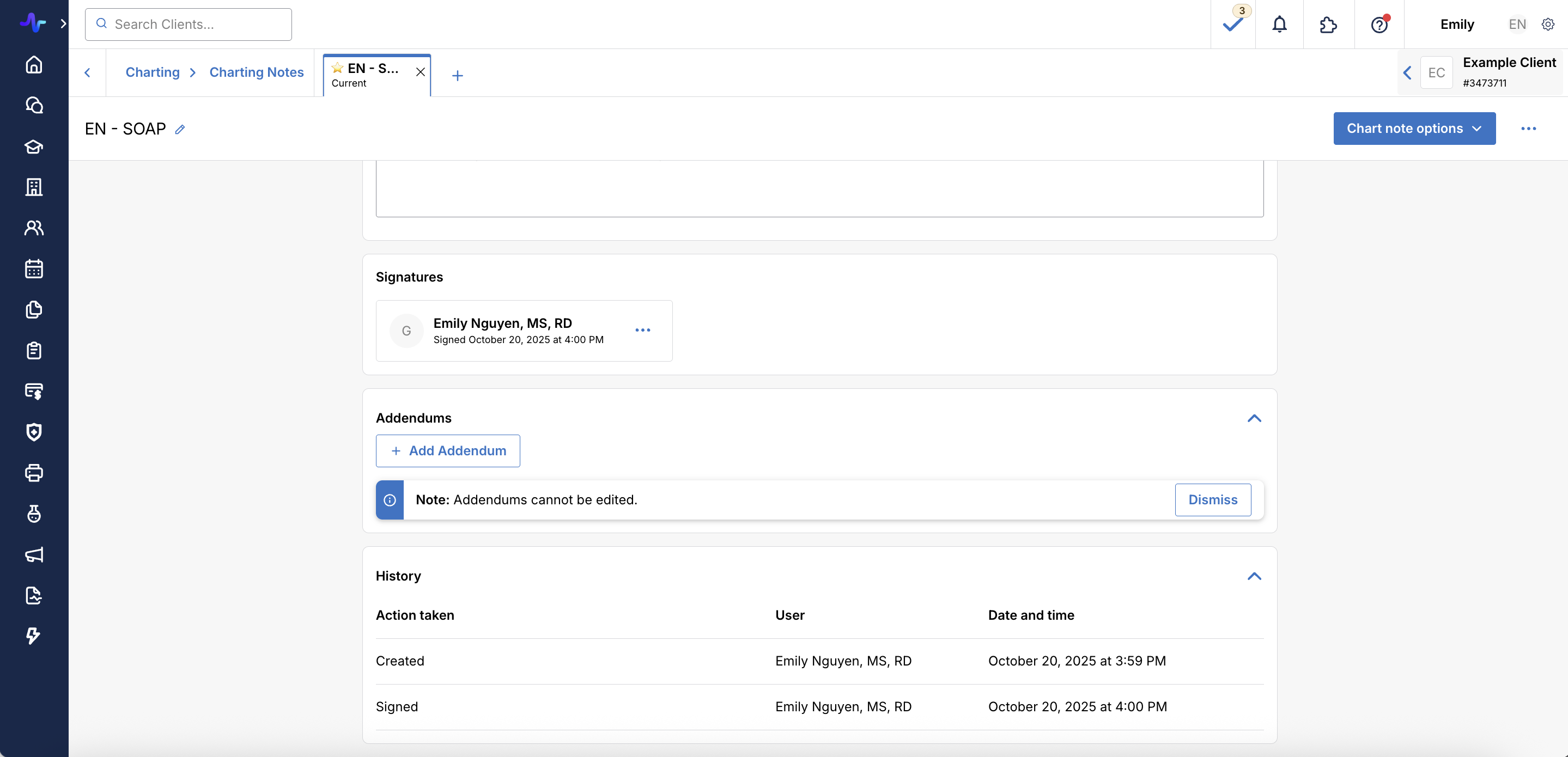
Addendums now appear in their own dedicated section, making them easier to find and review.
What’s improved
- Add Addendum is now surfaced via a clear, dedicated button
- Addendums are grouped together in a consistent layout
- The audit trail continues to track addendum activity
- Overall visibility and readability have been improved


Updated Charting Header & Note Actions (Edit View)
The header in the Edit View has been updated to improve clarity and make key actions easier to find. It now features an inline appointment display, indicating the appointment currently linked to the note directly in the header.
Revised Chart Note Actions
From the charting header, providers can now access:
- Save
- Save & Close
- Sign Note
- Lock Note
- Sign & Lock
These actions are grouped more logically, with consistent labeling and positioning.


Share and Export Options Now in the [⋯] (More) Menu
To create a cleaner Edit View, the Share button has been removed from the top-level header and moved into the [⋯] (More) menu.
The Share button remains unchanged in View mode.
Updated [⋯] (More) Menu Options
The menu now includes:
- Share
- Generate PDF
- Send Fax
- Create Superbill
- Export to CMS-1500
- Edit or unlink appointment
- Delete Charting Note
Note: the Edit or unlink appointment option will only display if the organization member has the "Can unlink chart notes from appointments" permission enabled.


Clearer Status Indicators: Signature, Lock, Addendums
Key statuses now appear more prominently at the top of the chart note, making it easier for providers to confirm whether a note has been signed, locked, or updated with an addendum.
What’s improved
- Signature status, lock status, and addendum status are easier to read and better aligned
- A new View History option is now available directly in the header


Update on Signing & Locking Behavior
Correction: we previously stated a change in signing and locking behavior that is not taking effect.
Charting workflow continues to reflect real-world documentation needs.
The behavior:
- Signed notes are uneditable unless unsigned. Signing a note adds a providers' signature and prevents further edits. To make changes to a signed note, providers first remove the signature
- To remove their own signature, providers do not need additional permissions beyond the Can sign own charting notes permission
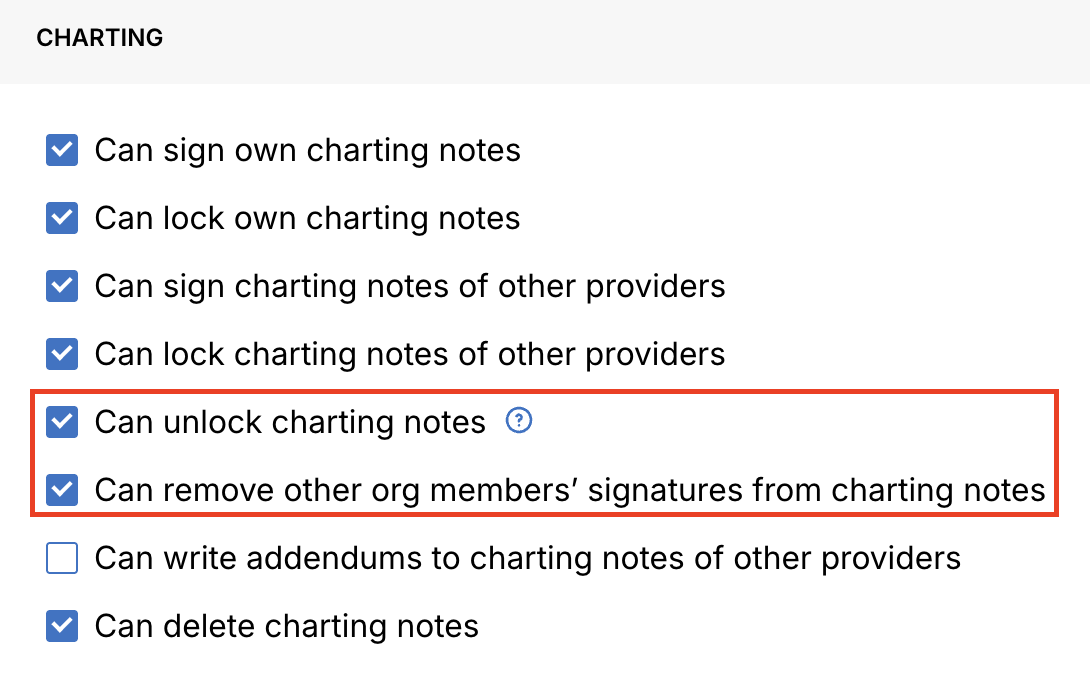
- To remove the signature of others, providers need the Can remove other org members' signatures from charting notes permission
- Locking a note is what finalizes it. Once a charting note is locked, no further edits can be made to the original content. Only providers with the appropriate permission enabled by an organization owner can unlock a note.
- Addendums remain available after signing and locking. Even after a note is signed and/or locked, providers can still add addendums to document updates or clarifications while preserving the original record.
Why this matters
This workflow maintains clear accountability for signed documentation while providing flexibility to make edits as needed. The lock feature offers a controlled finalization state with restricted unlock permissions for compliance and record integrity.
In short:
- Sign: confirm authorship and prevent edits
- Lock: prevent edits with restricted unlock permissions
Status indicators at the top of the note clearly show whether a charting note is signed, locked, or has addendums, so providers can quickly understand the note’s state before making changes.
Updated Display of Date Fields
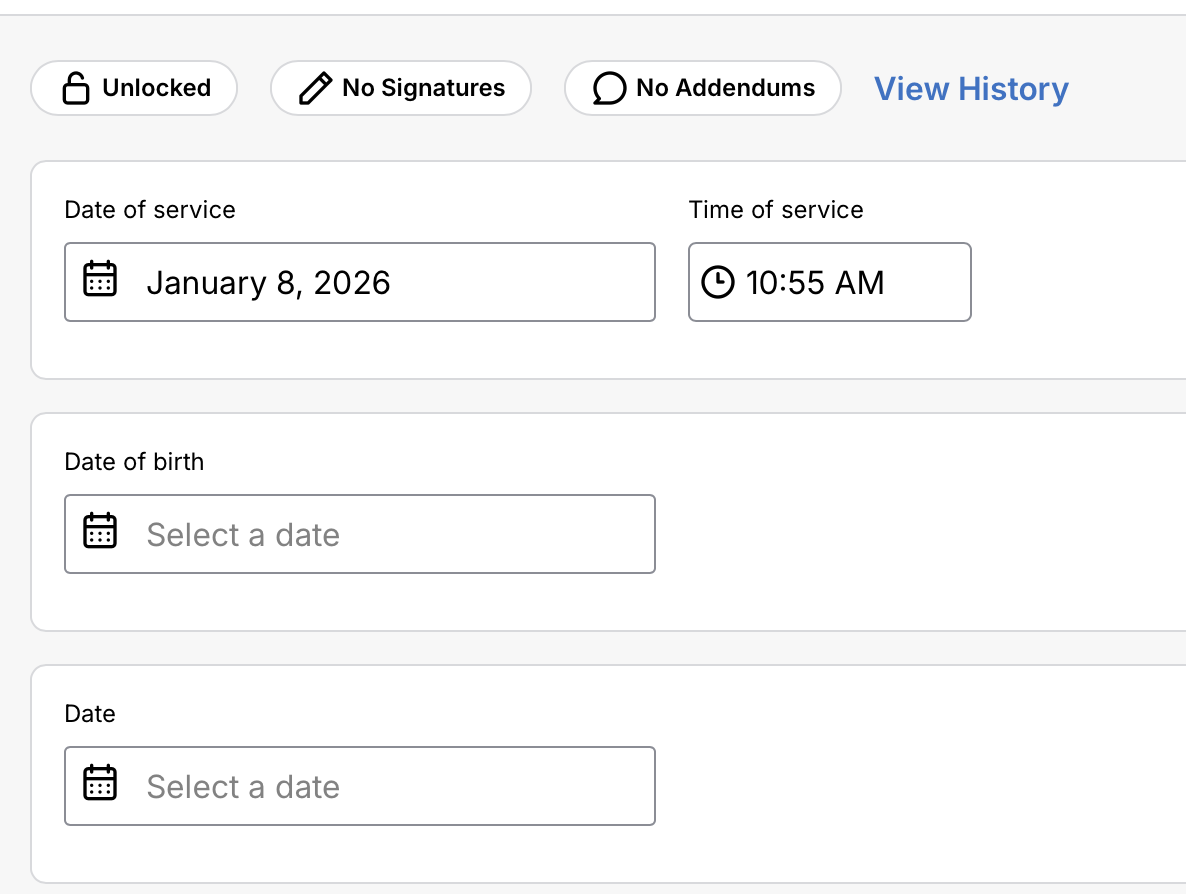
Date fields in charting notes will now appear as an easy-to-use single field with calendar selection. The Date of service and Time of service fields will still appear and auto-populate in the header of each charting note. All other date picker fields (Date of birth, Date) are improved to single fields.
The Date and Date of birth fields remain in MM/DD/YYYY format when you are creating and previewing a charting form.
Behind the Scenes: Modernized Architecture
This refresh includes significant frontend modernization work to improve long-term reliability, performance, and maintainability. These updates do not change functionality — they strengthen the foundation for future enhancements.
Key technical improvements
- Migrated remaining class-based components to modern functional components
- Replaced legacy Higher-Order Components with React hooks
- Transitioned away from Final Form to simplify dependencies
- Consolidated multiple variations of field components into a single, standardized set
- Improved change-detection logic powering the “There have been changes to this form” prompt
- Enhanced proactive monitoring and error detection for save workflows
These updates aim to reduce technical debt, improve charting stability, and support faster iteration on future charting features.
Summary of Improvements
- Cleaner, more readable Edit View
- More organized form answers and improved field usability
- Clearer addendum workflow
- Updated header actions and redesigned "More" menu
- Maintained lock & sign behavior to ensure clear authorship and accountability
- Modernized components for future scalability
- Improved reliability of change detection and save prompts
If you have questions or would like support reviewing your Charting workflows in staging, please contact your Customer Success Manager or reach us at hello@gethealthie.com.