
July 2026: Release Notes
Platform Release Notes: July 2026. Learn what new changes to the Healthie platform and mobile app that both providers and clients can expect to see. With new releases each week, make the most of Healthie's new features by bookmarking this help article and checking back frequently.
In this article:
- Org Member Now Join Zoom Group Appointments as Co-Hosts
- Reconnect Your Google Calendar in One Click
- Require Individual Client Notes for Group Sessions
- Group Charting Enhancements
- Chart Note Linking and Unlinking from Appointments
- Folder Sharing Improvements
- Additional Updates
- API Updates
- Past & Planned Updates
Org Members Now Join Zoom Group Appointments as Co-Hosts
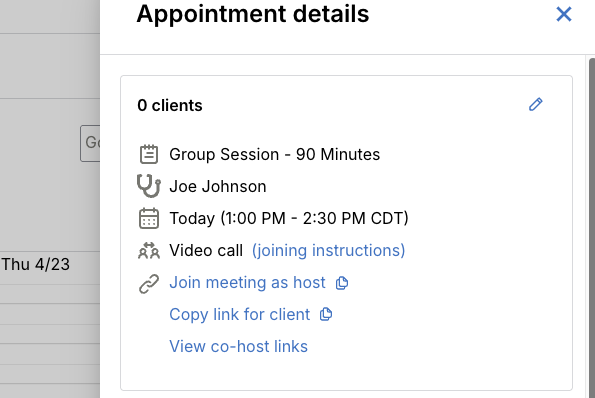
Other team members joining a virtual group appointment via Healthie's direct integration with Zoom, are now automatically promoted to co-host. This gives team members full meeting controls from the moment they join.
- Correct identity, automatically: Healthie registers other organization members as alternate hosts on the Zoom meeting, so they join as themselves.
- Co-host permissions: Participants can start and manage the meeting even if the primary provider hasn't joined yet.
- No setup required: Alternate host registration happens automatically when the appointment is scheduled from the Organization calendar, no manual Zoom configuration needed.
- Unchanged for clients and primary providers: Their experience remains exactly the same
Reconnect Your Google Calendar in One Click
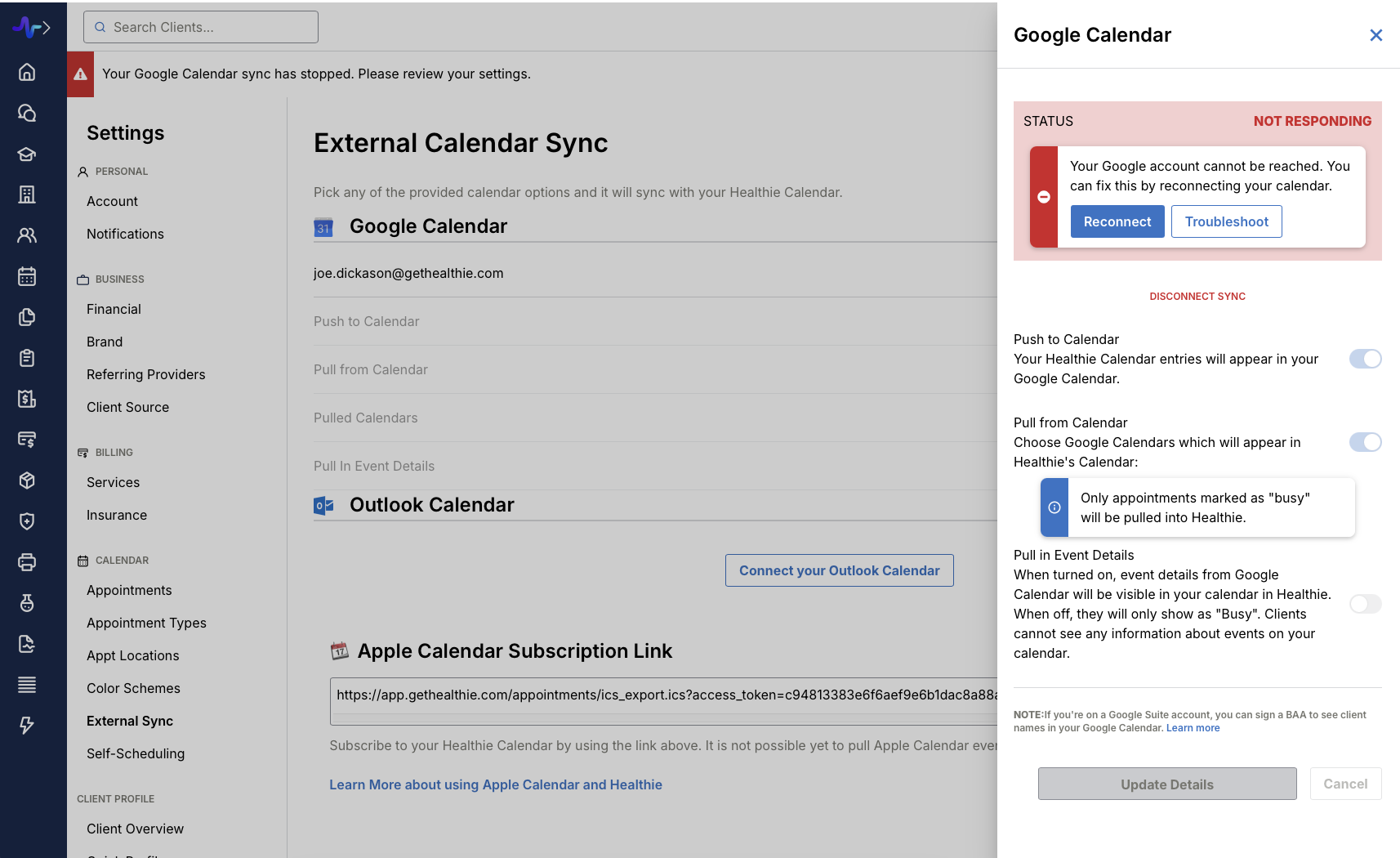
Reconnecting a Google Calendar that's lost sync just got a lot easier. If your sync ever stops working, (ie. your password changed or access was revoked) you'll now see a clear notification and a one-click Reconnect button right in your calendar settings.
Require Individual Client Notes for Group Sessions
Providers can now be blocked from signing or locking a group charting note until every attended client has their own individual note. This helps ensure documentation is complete before a group session is closed.
- Completeness check: Group notes can't be signed or locked until every attended client has a non-empty individual note
- Clear error messaging: If any clients are missing notes, the sign/lock error identifies exactly who still needs documentation
- Org-level setting: Practices can turn this on based on their own documentation and payer requirements by emailing hello@gethealthie.com
- No change to charting itself: Only the final sign/lock step is gated — how you document group sessions stays the same
Group Charting Enhancements
Group charting notes now support per-client Attended status, Join/Leave Time, and Diagnosis fields, giving organizations the structured, per-client documentation they need for billing, reporting, and clinical accountability.
- Attended checkbox: Mark individual attendance per client within the group note
- Join Time / Leave Time: Capture precise session participation times per client
- Diagnosis (ICD code lookup): Assign a per-client diagnosis directly within the group note
- Role-level control: Enabled per provider or org owner account, so it only applies to the roles that need it
Email hello@gethealthie.com to enable these individual client charting fields for group sessions.
Chart Note Linking and Unlinking from Appointments
Providers can now link, re-link, and unlink chart notes from appointments directly within the charting interface. This update gives providers full visibility and self-serve control over the chart note to appointment relationship.
- Inline appointment field: The linked appointment now appears in the chart note header alongside Date of Service and Time of Service
- Three-dot context menu: Access the "Edit or unlink appointment" action directly from chart note edit and view modes
- Prevent auto-re-linking: When unlinking, opt to prevent the background job from re-linking the note
- Signed and locked notes: Appointment linkage can be edited on signed and locked notes without reverting their status or requiring re-signing
- New permission: Org admins can enable the "Can unlink chart notes from appointments" permission for organization members
Folder Sharing Improvements
Folder sharing in Healthie has been rebuilt with a new side-sheet that improves the performance and reliability of folder sharing for organizations at scale. The document sharing modal has also moved from being a center pop-up to a side sheet.
- New User Interface: Folder sharing now opens in a clean, easy-to-navigate side sheet
- Server-side search: Search results are accurate and load instantly
- Performance at scale: The sharing UI stays fast and responsive even for organizations with 10,000+ clients
- Background sharing: Sharing with large client lists happens in the backend, so it never blocks other work
- No disruption to existing shares: All current configurations are preserved; no action required
Additional Updates
Minor bug fixes. Thank you for taking the time to report these issues to our team, so that we could diagnose and address them for those affected. If any of these issues persist, please let us know by contacting us at hello@gethealthie.com.
- Form editors can now configure Healthie AI Scribe-related form settings (like excluding a field from Scribe or setting Scribe instructions) even if Scribe isn't enabled on their own account, as long as their organization has Scribe available.
- Once an appointment's end time passes, its "Join appointment" banner now disappears automatically. When appointments are close together, the most relevant banner always stays on top.
API Updates
All features added this month are also available directly via the API. In addition, we are laser focused on building a best-in-class customer experience, which includes continuously investing in, and iterating on, our developer experience. This will include updates to documentation, SDKs, Webhooks and more, throughout the upcoming months.
- Healthie now sends two new webhook events when a patient joins or leaves the video call waiting room. Use these to notify providers the moment a patient arrives, or for event logging. To start receiving them, subscribe your webhook endpoint to these event types in your organization's webhook settings.
appointment.participant_joined_waiting_roomappointment.participant_left_waiting_room
Past & Planned Updates
- View all updates from last month here.
- See planned product updates on our Product Roadmap. Subscribe to roadmap items to get notified when they go-live.
- Learn how to add comments and submit feedback to our Roadmap here.