
June 2026: Release Notes
Platform Release Notes: June 2026. Learn what new changes to the Healthie platform and mobile app that both providers and clients can expect to see. With new releases each week, make the most of Healthie's new features by bookmarking this help article and checking back frequently.
In this article:
Improved Filters For Finding Provider Availability
New: Search Bar in Form Builder Question Bank
Update: Active-Only Filtering for Form Builder Medications Module
New: Diagnosis List Module with Multi-Diagnosis Support
Automatic Claim Status Updates from Claim.MD Rejections
Mental Health Carve-Out Plan Designation
Payments Dashboard: Data Model Upgrade
Update: Insurance Form Updates for Self-Pay Clients
Per-Client Program Pause and Resume
Task Commenting Now Available on iOS and Android
Mobile App Update: Video Uploads in Chat
Customize Your Form Completion Request Emails
Don't Send Emails to Archived Clients
Group Chat Members can Message with Group Settings Disabled
Centralized Password & Security Settings for Providers
Form Level Scribe Instructions
AI Scribe: Usage Dashboard in Visualize
Admins and Org Owners at organizations with an active AI Scribe subscription can now view their Scribe minutes usage directly in the Visualize section of Healthie.
The new Scribe Usage dashboard displays minutes used month to date and is refreshed daily. This gives your team a clear, convenient view of consumption without needing to contact support.

Improved Filters for Finding Provider Availability
The Provider and Organization Calendars now include expanded filter options and color scheme support for faster, cleaner availability views.
Updates include:
- "All" Contact Type filter — view availability across all contact types on the organization and provider availability calendars without selecting each one individually
- "All" Provider filter — see the full organization's availability (up to 100 providers) in a single view on the Organization and Availability Calendars
- Color schemes on the Organization and Provider Availability Calendars — color-coded availability blocks for easier visual scanning when multiple options are displayed
- Updated tile and hover content for clearer at-a-glance info on calendar availability
No configuration required. Available on all plans.
New: Search Bar in Form Builder Question Bank
Finding modules in the Form Builder Question Bank just got a lot faster. You can now search by module name directly within the Question Bank no more scrolling through hundreds of entries to find the one you need.
- Instant search: Type any module name to surface matching results immediately. Enter at least 3 characters to search across all available categories.
- Works with large libraries: Designed for teams managing hundreds of saved modules across complex multi-template workflows.
- No setup required: Search is available immediately in the Form Builder for all admins.
- Same Question Bank, better experience: All existing saved modules remain exactly where they are.
This improvement makes the Question Bank a more reliable and practical tool for building and maintaining clinical form templates at scale.
Update: Active-Only Filtering for Form Builder Medications Module
Healthie's Medications module now includes an option to display only active medications in chart notes, reducing clutter and helping providers stay focused during clinical sessions.
- Active-only filtering: Enable "Show active medications only" in the Form Builder to hide inactive medications from chart note views.
- Template-level control: Configured once per template (no per-session adjustments required).
- Contextual guidance: When active-only filtering is on, a notice in the chart note points providers to the client profile for inactive medications.
- Backward-compatible: Existing Medication module instances are unaffected, the default remains show all.
These updates help practices reduce documentation noise and keep charting focused on what matters most in each session.

New: Diagnosis List Module with Multi-Diagnosis Support
Healthie's new Diagnosis List Module gives providers the clinical tools they need to document diagnoses accurately and efficiently within charting. This release makes diagnoses a dedicated clinical data object, with consistent behavior across Form Builder, Charting, and the Client Profile.
- Multi-diagnosis support: Add and manage more than one diagnosis per client within any charting template.
- Active/inactive status: Set and filter diagnosis status with onset date tracking, no more switching to the client profile mid-note.
- In-note visibility: Reference a client's existing diagnoses while writing a note, without leaving the charting view.
- Improved ICD-10 search: A standardized code list delivers faster, more accurate results.
These updates help practices document more completely, reduce manual re-entry, and support more accurate billing and clinical records.

Automatic Claim Status Updates from Claim.MD Rejections
Automatic Claim Status Updates from Claim.MD Rejections
CMS-1500 claims submitted through Claim.MD now automatically update to "Rejected by Clearinghouse" status on the CMS-1500 page when a rejection is received from the clearinghouse. The rejection reason is also populated directly on the claim, giving your team full visibility into why a claim was rejected - all without leaving Healthie.

Mental Health Carve-Out Plan Designation
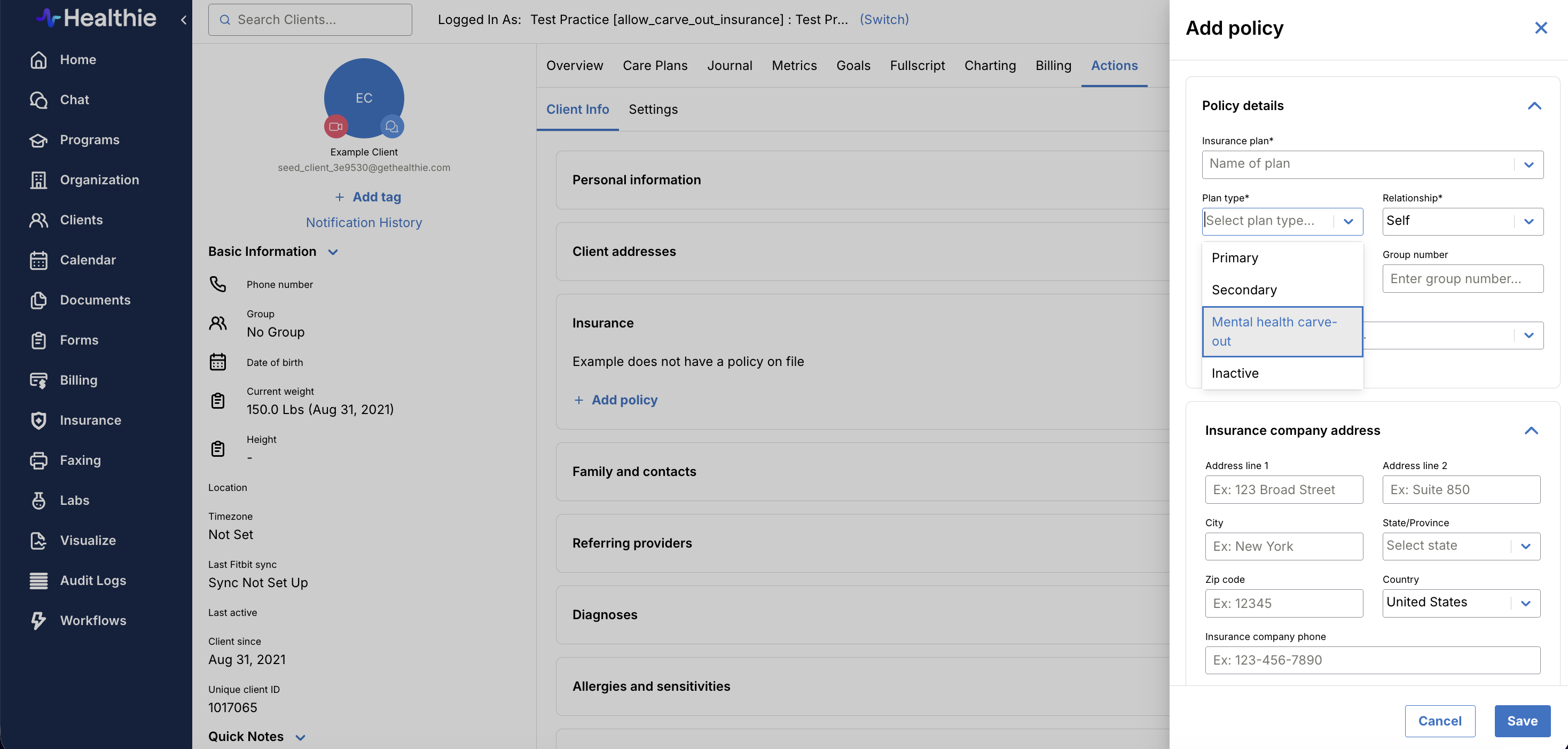
Providers can now designate a client's insurance policy as a Mental Health Carve-Out plan type. When enabled for your organization, this option appears in the Plan Type dropdown on a client's insurance policy and carries through automatically to CMS 1500 claims.
This feature is available on request. To enable it for your organization, contact us at hello@gethealthie.com.
Multiple Payout Accounts
For Enterprise organizations with multi-entity or multi-state billing needs, Healthie supports connecting multiple Stripe Connected Accounts within a single organization via Payout Accounts.
Account management — including creating accounts, completing Stripe onboarding, and renaming or listing accounts — is available in the UI.
Routing payments to a specific account at the point of transaction is currently available via API using payout_account_uuid
Contact your CSM to learn more about enablement.
Payments Dashboard: Data Model Upgrade
The Payments Dashboard has been migrated to a new dimensional data model. Aggregate totals are consistent with the previous version. The following changes are now in effect for the Details Table:
- Payment dates now display in the provider's local timezone (previously UTC)
- Refunded amounts now appear as an inline column on the original payment row; the "Payment Type" column has been removed
- Payment Type labels updated: "Charge Client" to "Charge Payment"; "Undefined Payment Type" to "Not Provided"
- Improved data population for Original Price, Item Purchased, Appointment ID, and Invoice ID
- Coupon values now consistently formatted to two decimal places
- Billing Period accuracy improved
- Bank Transfer data now scoped to payment source only
Note: The "Payment Type" column has been removed from the raw report download. Customers using custom queries or automated exports referencing this column should update their configurations prior to the release date.
Insurance Form Updates for Self-Pay Clients
The Insurance Form has been updated to improve the experience for self-pay clients. A new radio button at the top of the insurance section asks clients whether they have insurance. If a client selects "I don't use insurance," all insurance-specific fields (Member ID, Group Number, Relationship to Policyholder, and card uploads) are automatically hidden, and the form can be submitted without them. This prevents self-pay clients from being blocked or confused by fields that don't apply to them.

Per-Client Program Pause & Resume
Providers can now pause and resume programs on a per-client basis — giving care teams the flexibility to handle real-life interruptions without disrupting a client's program enrollment or progress.
- Pause at the client level: Use the new pause action in the program's client list to pause any individual client's program.
- Auto-release and notifications stop: Module auto-release halts and program notifications are suppressed for the paused client.
- Progress is preserved: Clients retain access to all modules they've already completed while their program is paused.
- Resume where they left off: When providers resume the program, auto-release picks up from where it stopped — no manual reconfiguration needed.
- Clear paused status: The paused state is visible directly in the client list for easy tracking.
This update eliminates the need to remove and re-enroll clients as a workaround, saving time and protecting the client experience.
Task Commenting Now Available on iOS and Android
You can now view and add comments on tasks directly from the Healthie mobile app — the same commenting experience available on web, now on iOS and Android. This update closes a key platform gap, giving providers and clients a consistent way to communicate around tasks no matter where they're working.
- Comment on the go: Add and view task comments directly from your phone.
- Cross-platform sync: Comments added on mobile are immediately visible on web, and vice versa.
- Consistent behavior: Formatting and functionality match the web experience exactly.
- Works on both platforms: Available on native iOS and Android apps.
Task communication now follows you wherever you work — no desktop required.
Mobile App Update: Video Uploads in Chat
Providers and clients can now upload and share videos in Healthie's chat on iOS and Android, matching the video functionality already available on web. Specifically, you will be able to:
- Upload videos from mobile: Select and send video files directly from your iOS or Android device in any chat conversation.
- Share video links from websites such as YouTube and Vimeo
- Full parity with web: Supported formats and file size limits are consistent with the existing web experience.
- Playback for all participants: Uploaded videos are visible and playable for everyone in the conversation.
Whether you're sharing an exercise walkthrough, a quick educational clip, or a session recap, video in mobile chat keeps care teams connected wherever they're working.
Customize Your Form Completion Request Emails
Organizations can now customize the automated email sent to clients when a form completion request is triggered. This update adds the form completion request email to Healthie's existing Email Templates settings - giving you direct control over subject line, body copy, and sender name.
To customize, navigate to Settings > Email Templates. Organizations that don't wish to customize this will continue sending the standard template without any disruption.
Don’t Send Emails to Archived Clients
With a new setting, archived clients will no longer receive automated emails or notifications from Healthie.
When a client is archived, providers can select Settings > Journal entries > Lock archived clients out of login and stop sending them automated emails. This stops all automated outbound communications — including appointment reminders, message blasts, program notifications, and chat email notifications — and prevents the provider’s clients from logging in. Unarchiving a client restores normal communication behavior.
Note: Manual emails sent directly by providers are not affected by this change.
Group Chat Members can Message with Group Settings Disabled
We've corrected how Healthie enforces group conversation permissions, ensuring users who are members of a group conversation can always send messages - even when their allow_group_level_actions setting is disabled. This aligns platform behavior with the original intent of the permission: controlling who can create group conversations or add members, not who can reply in ones they already belong to.
- Reply access restored: Users added to a group conversation can now send messages, regardless of their group-level action permissions.
- Scoped correctly: The
allow_group_level_actionspermission now applies only to creating conversations and adding members - not to replying. - No admin action needed: Existing permission settings remain unchanged; behavior is automatically corrected.
This update removes unintended friction for care teams that rely on group messaging while maintaining appropriate controls over who can initiate group-level actions.
Centralized Password & Security Settings for Providers
Providers now have a dedicated Password & Security page (Settings > Account > Password & Security) to manage account security in one place.
What's included:
- Change Password: Update your password at any time.
- Passkeys: Register and manage phishing-resistant passkeys (Face ID, Touch ID, hardware keys). Note: passkeys don't replace MFA; that challenge still applies if required by your org.
- MFA Methods: Add or remove authentication methods without waiting for your next login. Keep more than one active as a backup. At least one method must remain active if MFA is required.
- Recovery Codes: Generated at MFA setup. Store yours somewhere safe in case your primary method is unavailable.
- Login Sessions: See all active sessions with device, location, and IP details. Log out of individual sessions or revoke all others at once.

Form-Level Scribe Instructions
Providers can now add form-level AI Scribe instructions directly in the form builder for charting forms, giving you persistent, note-wide control over how Scribe documents every encounter on that form.
Use form-level instructions to tailor output to your specialty and documentation style, including:
- Tone and voice — e.g., formal clinical language vs. plain-language summaries for patient-facing notes
- Level of detail — e.g., concise SOAP notes for follow-ups vs. comprehensive new patient workups
- Section structure — e.g., preferred HPI format, how ROS should be captured, or whether to include a differential
- Diagnosis and plan phrasing — e.g., always lead with primary diagnosis, use ICD-10 language, or include clinical reasoning statements
- Specialty-specific defaults — e.g., always document foot exam findings on diabetes visits, or add attestation language for teaching physicians
Once set, these instructions apply automatically every time Scribe generates a note from that form, no need to re-enter preferences visit after visit.

Image Module for Form Builder
You can now add images directly to your form templates using a new, dedicated Image module in the Form Builder Default Question Bank. Simply drag and drop the module onto your form, upload your image, and choose your preferred alignment and size.
- Drag and drop: Find the Image module in the Default Question Bank and drag it onto any form template
- Upload your image: Click "Edit" on the module to open the control panel and upload your file
- Set alignment: Choose Left, Center, or Right
- Choose a size: Small, Medium, Large, or Original
- Staged changes: All edits are applied when you click "Save Image"

Update: Lab Ordering Now Powered by Fullscript
As part of Rupa Health's transition to Fullscript, lab ordering in Healthie now routes through Fullscript Labs. Entry points across Client Overview, Labs, and Quick Profile have been updated accordingly. Historical Rupa orders remain visible in read-only view. Current Fullscript users need to enable the "Can order labs" and "Can view labs" permissions to access the new lab entry points.
Additional Updates
Minor bug fixes. Thank you for taking the time to report these issues to our team, so that we could diagnose and address them for those affected. If any of these issues persist, please let us know by contacting us at hello@gethealthie.com.
- The "Should see option to use Fullscript within Healthie" permission now correctly controls Fullscript tab visibility. When disabled, the tab will no longer appear on client profiles.
- The provider calendar in both day view and week view now displays a red line marking the current time. This gives providers an instant visual anchor for where they are in the day.
API Updates
All features added this month are also available directly via the API. In addition, we are laser focused on building a best-in-class customer experience, which includes continuously investing in, and iterating on, our developer experience. This will include updates to documentation, SDKs, Webhooks and more, throughout the upcoming months.
Past & Planned Updates
- View all updates from last month here.
- See planned product updates on our Product Roadmap. Subscribe to roadmap items to get notified when they go-live.
- Learn how to add comments and submit feedback to our Roadmap here.