
October 2026: Release Notes
Platform Release Notes: October 2026. Learn what new changes to the Healthie platform and mobile app that both providers and clients can expect to see. With new releases each week, make the most of Healthie's new features by bookmarking this help article and checking back frequently.
IN THIS ARTICLE:
- Create and Edit Chart Notes on Mobile
- Prevent Clients from Editing Their Name
- Provider Utilization Dashboard Enhancements
- Availability Calendar Refresh
- Zocdoc Referrals
- Client List Provider and Group Filters
- Calendar Block Title Update
- AI Scribe ReRun
- Additional Updates
- API Updates
- Past & Planned Updates
Create and Edit Chart Notes on Mobile
Providers can now create, edit, sign, and lock chart notes directly from the Healthie iOS and Android app, completing the charting workflow that started with read-only mobile notes. Notes can be finalized with the same signing and locking options available on web, with a confirmation step before locking.
To make a correction, an authorized provider can unlock a note (a reason is required and logged to the note's history), or add an addendum to a locked note without reopening it. Notes that haven't been signed or locked can be deleted from mobile. All actions respect your organization's existing charting permissions, and capabilities are rolling out in phases.
Prevent Clients from Editing Their Name in the Portal
Org admins can now lock a client's legal name so it stays provider-controlled. A new Prevent clients from editing their name setting is available for all organizations and is off by default, so nothing changes until an admin turns it on.
How to turn it on:
- Go to Settings > Client Profile Settings > Settings
- Find the Name editing configuration section > Edit to enable or disable the setting.
What this means:
When enabled, clients will not be able to edit their first or last name in the client portal.
- Legal name is locked for clients. When the setting is on, legal first name and last name are read-only in both the client portal and the mobile app. Helper text lets clients know to contact their provider to request a change.
- Preferred first name stays editable. Clients can still update how they'd like to be addressed.
- Providers keep full control. Providers can edit client names as usual.
- Enforced across the platform. Legal name changes made through the API are also blocked when the setting is on.
- Clearer field labels. Name fields are now labeled consistently across the portal, provider view, and mobile app: First name (preferred), First name (legal), and Last name (legal).
Provider Utilization Dashboard Enhancements
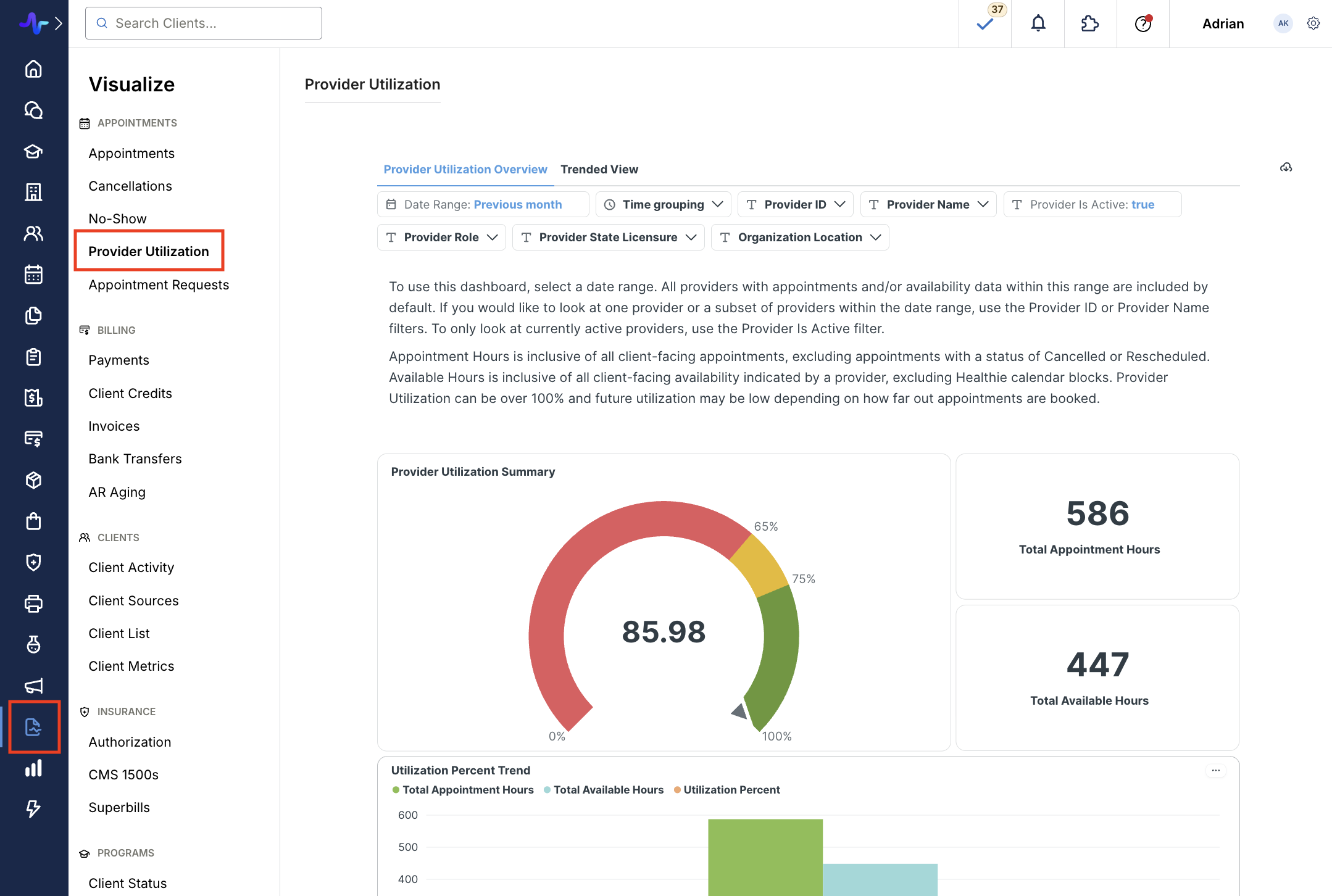
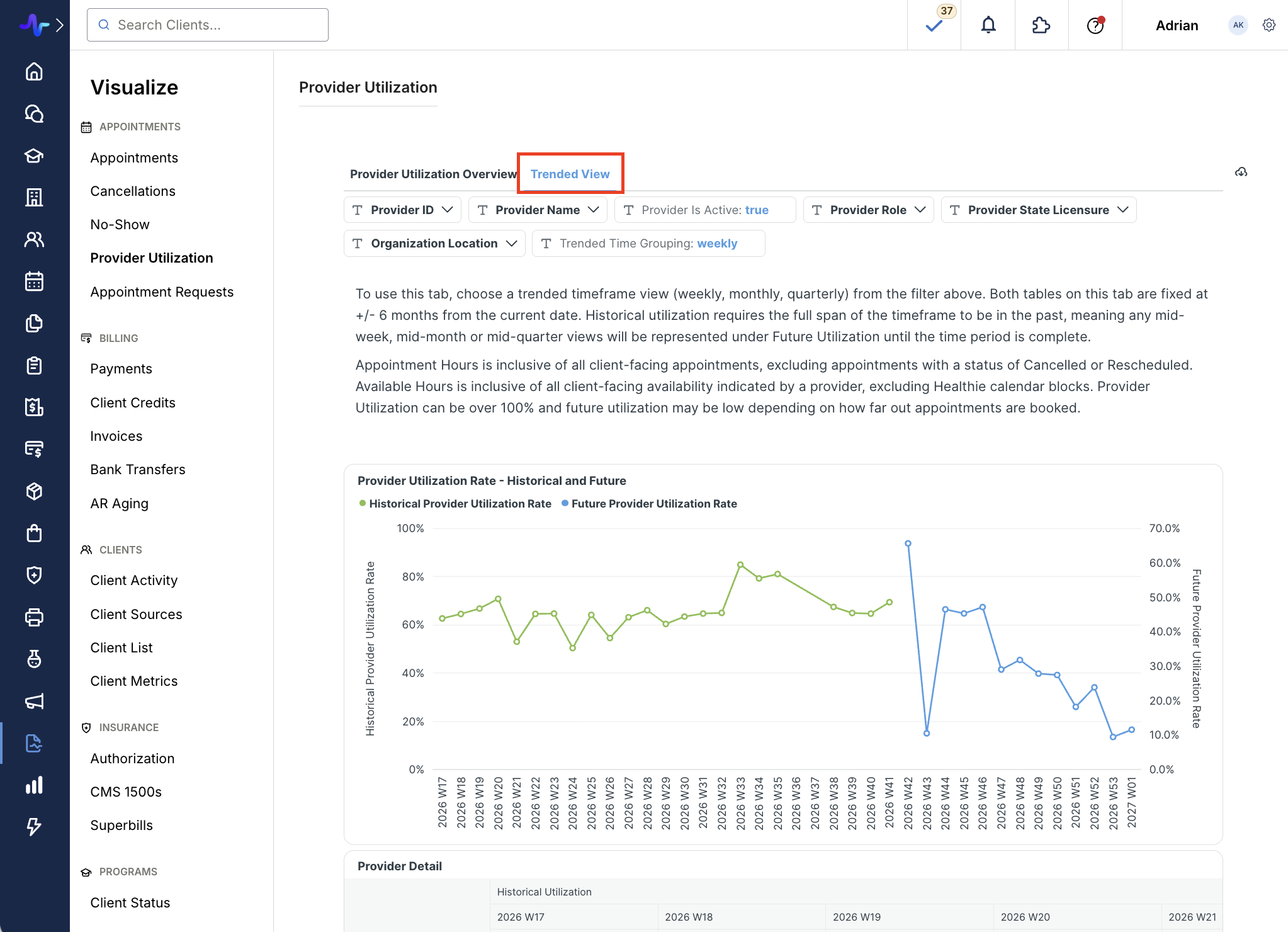
The Provider Utilization Dashboard in Visualize now includes a trended view, appointment counts, upcoming availability by provider, and new filters, so you can track capacity over time and plan around future availability.
What’s included:
- Trended view: Compare utilization week over week or month over month on the new Trended view tab.
- Flexible trend chart: Group the Utilization Percent Trend chart by day, week, or month.
- Upcoming availability: See future utilization by provider to plan scheduling and staffing.
- Appointment counts: See how many appointments sit behind each utilization figure in the table.
- New filters: Filter by provider status, organization location, and provider role within the organization.
Availability Calendar Refresh
Healthie's Availability Calendar now matches the Organization Calendar's layout and navigation, making it easier to manage availability across views.
- New day view: See a single day's availability with the same level of detail available in the Organization Calendar.
- Updated navigation: The "Today" button, previous/next arrows, and a calendar date picker are now available on the Availability Calendar.
- Consistent header: The calendar header now matches the Organization Calendar across all calendar surfaces.
- Redesigned filters: Timezone has moved to the filter side panel, which is now wider and repositioned for easier access.
Zocdoc Referrals
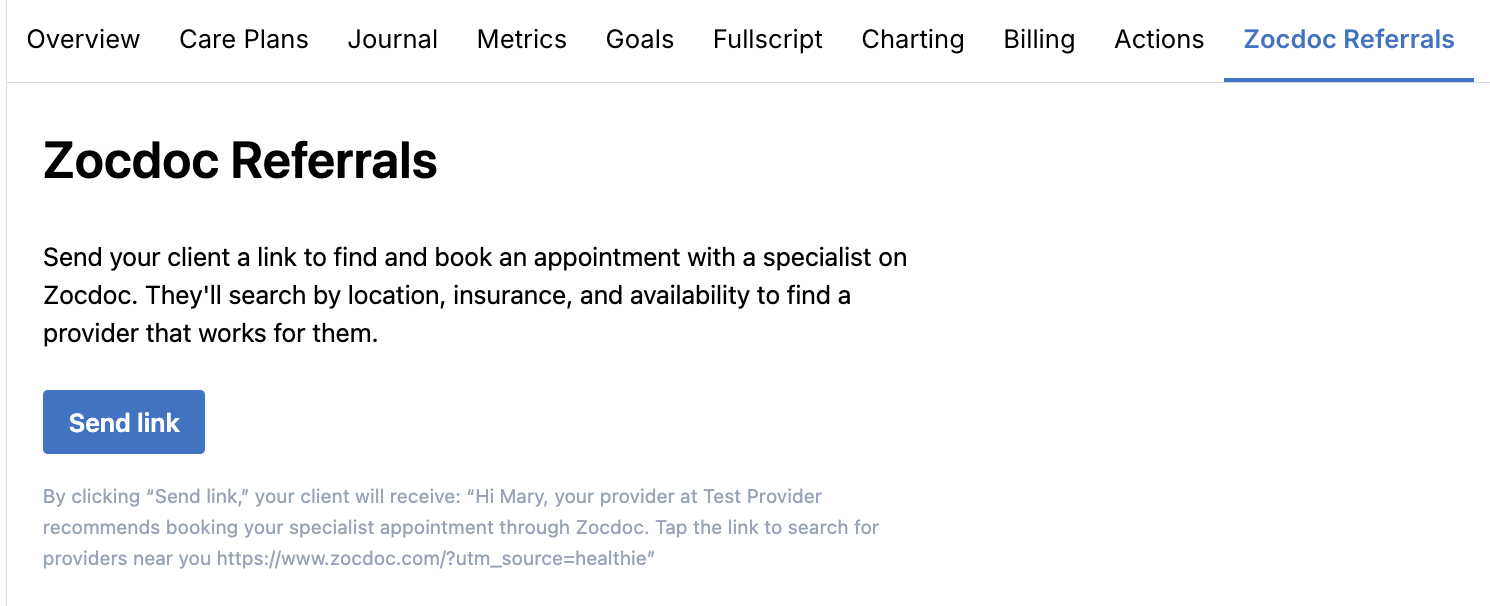
Providers can now send clients a direct link to find and book a specialist appointment on Zocdoc, right from the client profile. Whether you're referring a client to a specialist, a primary care physician, or another provider type, you can send the referral in the moment, during or after a session, with no separate follow-up task needed.
How it works:
- Open a client's profile and select the Zocdoc Referrals tab
- Review the pre-formatted referral message and click Send link
- Healthie delivers the message to the client via Chat, with a link to search for providers near them on Zocdoc
Zocdoc Referrals is available at no cost on all paid Healthie plans and works independently of Healthie's Zocdoc integration.
Account owners can email hello@gethealthie.com to request access. Once enabled, it turns on for all providers in the organization.
Client List Provider and Group Filters
We've added provider and group filters to the Client List so you can find the clients you need faster. Combine them with the existing Tags filter to narrow large rosters without scrolling or extra searching.
- Filter by provider: See clients assigned to one or more selected providers.
- Filter by group: Focus on clients in one or more selected groups.
- Combine filters: Use Tags, Provider, and Group together to narrow results.
- Stay in control: Filters respect your existing client visibility permissions.
Calendar Block Title Update
Calendar blocks now show their title on the tile, so you can tell what a block is without opening it. Repeating blocks show a recurrence icon next to the title. This update makes your schedule easier to read at a glance.
AI Scribe Rerun
Providers can now rerun an AI Scribe draft note if the first draft misses details or gets something wrong. Each appointment gets one rerun, and the new draft replaces the original, so you can get to a usable note without starting over.
How it works:
- Open the draft note and click the three-dot menu on the Draft note card
- Select Rerun AI Scribe, choose your reasons, and add optional context
- Review the new draft when it’s ready, then click Convert to chart note
Scribe Rerun is available on the same plans as AI Scribe. Providers, org admins, and org owners can rerun a draft note. Learn More.
Additional Updates
Minor bug fixes. Thank you for taking the time to report these issues to our team, so that we could diagnose and address them for those affected. If any of these issues persist, please let us know by contacting us at hello@gethealthie.com.
API Updates
All features added this month are also available directly via the API. In addition, we are laser focused on building a best-in-class customer experience, which includes continuously investing in, and iterating on, our developer experience. This will include updates to documentation, SDKs, webhooks and more, throughout the upcoming months.
- As of September 1, 2026, Healthie introduced dynamic complexity scaling for appointment search queries. Queries that include Zoom-related fields and span longer date ranges will carry a higher complexity score, and requests that exceed the threshold will return a complexity-limit error. Starting Nov 1, 2026, the threshold rate will be stepped down to searches spanning 6+ months. Learn more.
Healthie is migrating its infrastructure from Aptible to AWS, with completion expected in November. If your systems allowlist Healthie's IP addresses to receive outgoing webhooks, you will need to add our new IP addresses to avoid any interruption.
- Production:
52.203.95.168 - Sandbox/staging:
52.200.234.230(IP change only; your sandbox URL and data are not changing)
What to do:
- Add the new IP(s) to your allowlist by Friday, Nov 6.
- Keep your existing Healthie IPs in place until we confirm the migration is complete.
- If you don't use an IP allowlist, no action is needed.
You may notice brief periods of after-hours downtime during the final migration. We will post timing on our status page at https://status.gethealthie.com/
See the API documentation (IP addresses) for details: https://docs.gethealthie.com/guides/webhooks/#security
Past & Planned Updates
- View all updates from last month here.
- See planned product updates on our Product Roadmap.