
May 2026: Release Notes
Platform Release Notes: May 2026. Learn what new changes to the Healthie platform and mobile app that both providers and clients can expect to see. With new releases each week, make the most of Healthie's new features by bookmarking this help article and checking back frequently.
In this article:
- New: Fullscript Labs Integration
- New: Metrics Tab in Quick Profile
- Update: Search for Specific Client when Document Sharing
- New: E-Rx and E-Labs Direct Orders Link to Chart Notes
- New: Smart Phrases in Chart Note Addendums
- New: Smart Phrases in Task Comments
- New: Client-Level Billing Type for Accurate, Automatic Billing
- New: Ambient Scribe
- Additional AI Scribe Updates
- Additional Updates
- API Updates
- Past & Planned Updates
New: Fullscript Labs Integration
Healthie now integrates with Fullscript Labs to automatically sync lab results directly into patient charts; keeping your practice efficient and your data centralized. This integration delivers the workflow simplicity your team needs to manage labs without extra steps.
- One-click for Fullscript Labs and Supplements: Click on Add Recommendation from the Client Profile > Fullscript to access whole-person care.
- Auto-sync results: Fullscript lab results flow directly into patient profiles and the Labs tab - no manual uploads needed.
- Order status at a glance: Track Fullscript orders alongside other lab vendors in one unified view.
- Native notifications: Manage lab result alerts and patient sharing directly within Healthie's familiar interface.
- Unified lab management: Keep all lab data in one place, regardless of which vendor processed the order.
This integration ensures your lab workflows remain seamless, your data stays centralized, and your team can focus on patient care - not administrative tasks.
👉Learn More: Fullscript Labs and Healthie
New: Metrics Tab in Quick Profile
Providers can now view client metrics directly within the Quick Profile, without navigating away from the charting context.
The new Metrics tab displays all configured patient metrics as interactive line graphs, making it easier to reference historical data and identify trends during clinical sessions.
- Stay in context: Access metrics without leaving the charting interface.
- Visualize trends: View metrics as line graphs showing values across multiple dates.
- Search and filter: Find specific metrics by name or narrow results by a date range.
- Detailed data points: Hover or click to see exact values and dates for any data point.

This update helps providers make faster, more informed clinical decisions without breaking their charting flow.
👉 Learn more: Review Metrics from the Quick Profile
Update: Search for Specific Client when Document Sharing
The Share Document modal has been updated to improve performance for orgs with large client rosters. Instead of waiting for the full client list to load, the modal now displays an initial set of up to 500 clients, groups, and org members on open — with live search available immediately to find any client by name. A "Type to search for more" prompt guides users when their client is not in the initial list. The "Share with All Clients" toggle also now works reliably without requiring all clients to be loaded first. No action is required.
👉 Learn more: Sharing Documents and Folders
New: E-Rx and E-Labs Direct Orders Link to Chart Notes
Lab orders, prescription orders, and PDMP check records can now flow directly into chart notes - creating a more connected record between clinical encounters and orders, and making compliance-sensitive workflows easier to manage.
- Associate E-Rx Orders with Chart Notes (DoseSpot users): When placing an E-Rx order from the Quick Profile, providers can select a chart note before the DoseSpot prescribing window opens. Once submitted, the prescription is automatically displayed in a "Medication Orders" section on the chart note across all surfaces (view, edit, PDF, share).
- Associate E-Labs Orders with Chart Notes (E-Labs Direct users): A new "Order E-Labs" button within the charting interface opens a side modal, allowing providers to place a lab order and associate it with a chart note without leaving the clinical documentation flow. Lab data populates automatically in a "Lab Orders" section once the order is submitted.
- PDMP Timestamp in Chart Notes (DoseSpot users): For organizations using Bamboo Health through DoseSpot to complete PDMP checks, a timestamp can now appear within the chart note indicating when the most recent check was performed - no additional configuration required when Associate E-Rx Orders with Chart Notes is enabled.
To enable these features at the organization level, contact hello@gethealthie.com.
👉 Learn more: Associate E-Rx Orders with Chart Note, Associate E-Labs Direct Orders with Chart Note and PDMP Check Visibility in Chart Note
New: Smart Phrases in Chart Note Addendums
Smart Phrases are now available in addendums. Click the lightbulb icon in the rich text editor to open your Smart Phrase library and insert pre-written shortcuts - the same way they work in chart notes today. Both personal and org-shared phrases are supported.
👉 Learn more: Add an Addendum to a Signed or Locked Chart Note

New: Smart Phrases in Task Comments
Smart Phrases are now available in task comments. Click the lightbulb icon in the rich text editor to open your Smart Phrase library and insert pre-written shortcuts - the same way they work in chart notes today. Both personal and org-shared phrases are supported.
👉 Learn More: Task Commenting

New: Client-Level Billing Type for Accurate, Automatic Billing
Billing workflows just got smarter. You can now set a persistent billing type — Insurance or Self-Pay — directly within each client's profile, giving your practice a reliable source of truth that overrides global Appointment Type defaults when needed.
- Client-level control: Set billing type in Client Profile > Actions for any client whose needs differ from your standard workflow.
- Automatic triggers: The correct billing workflow fires at every appointment — no manual override required.
- Edge case coverage: Easily manage clients with pending insurance verification, or those who prefer self-pay despite having insurance on file.
- Fewer errors: Reduce billing mismatches and the manual data entry that comes with them.
This update gives your team the flexibility to handle complex billing scenarios while keeping your workflows consistent and accurate.
👉Learn more: how to enable this feature
Ambient Scribe — Now Available 🎉
AI Scribe, Healthie's AI-powered charting tool, now extends to in-person and phone sessions with the launch of Ambient Scribe.
Ambient Scribe brings the same automatic note generation to your in-person and phone appointments — reducing documentation time for providers across your organization.
What's new:
- AI-powered charting now supported for in-person and phone sessions
- "Launch Ambient Scribe for In-Person Session" prompt appears directly within appointment details
- Compatible with existing appointment types that include multiple contact types (telehealth + in-person or phone)
- Chart note templates can be assigned to phone or in-person only appointment types once Ambient Scribe is live on your account
Getting started:
- Read the Ambient Scribe Getting Started Guide for a full walkthrough of setup and how to run your first Ambient session
- Watch a quick demo to see Ambient Scribe in action
Not yet using AI Scribe?
Complete the Request AI Scribe form and our team will be in touch to get you set up.
Additional AI Scribe Updates
- AI Scribe Will Ignore Specific Form Fields. You can now exclude specific fields from AI Scribe using the new Exclude Field from Scribe checkbox in the Edit Field modal. Excluded fields are removed from the request before it reaches the AI entirely — meaning Scribe has no knowledge of them — and their original values are preserved after Scribe runs. This is a hard guarantee, not a best-effort instruction. Excluded fields are also visually marked in the generated note so providers can easily distinguish intentionally skipped fields from those that were missed.

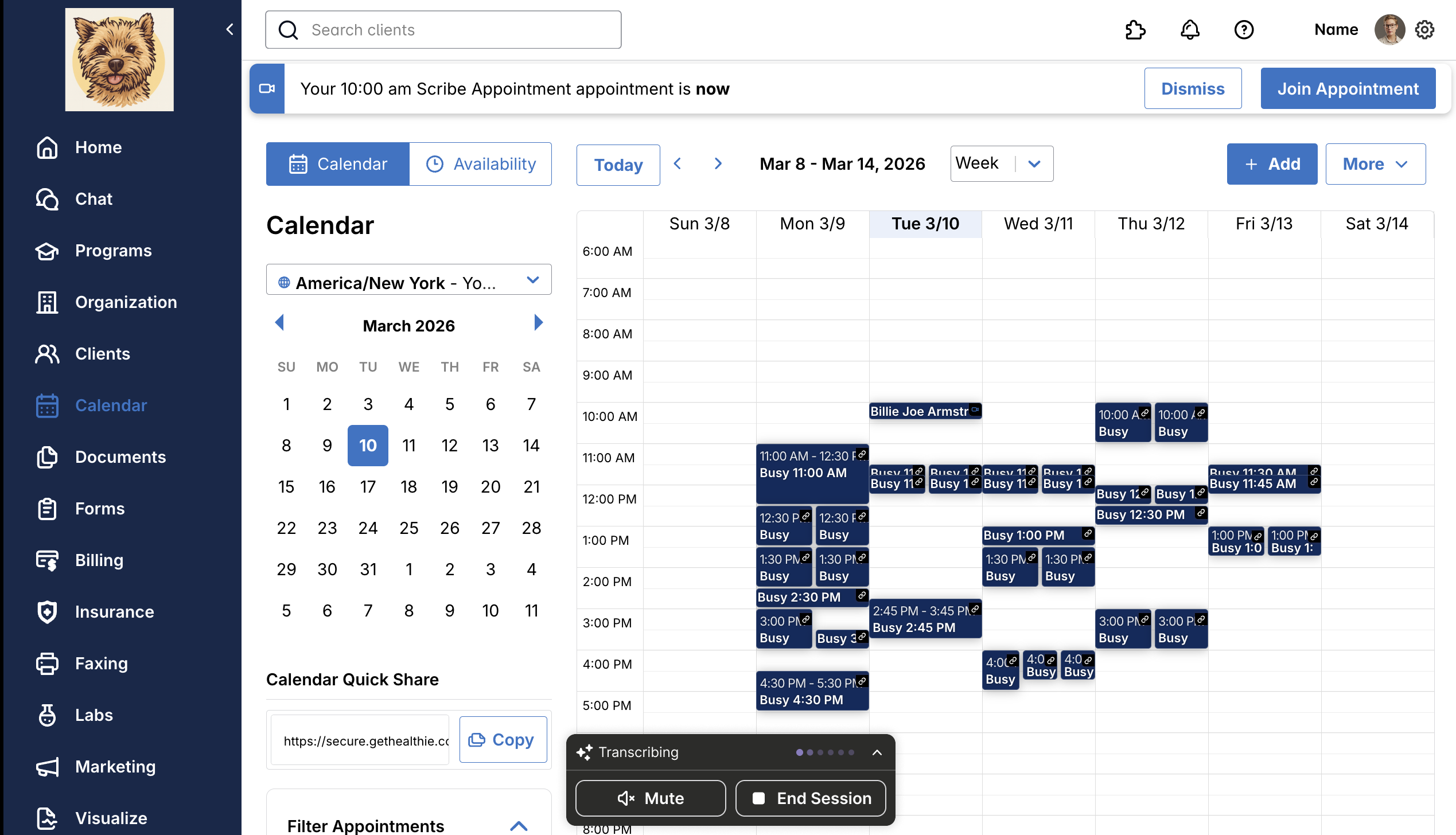
- Ambient Session Tab Widget: Providers can now open a new tab during an Ambient session without losing confidence in their transcription — a persistent widget will appear with a live session indicator, along with quick options to mute or end the session.
Additional Updates
Minor bug fixes. Thank you for taking the time to report these issues to our team, so that we could diagnose and address them for those affected. If any of these issues persist, please let us know by contacting us at hello@gethealthie.com.
- “Technical Problems” is now an option for provider and client cancellation reasons.
- Improved editing behavior for group appointment series: while a series is still being created, an informational banner on the Edit Appointment sidesheet confirms the series is still processing and that any edits will apply to the single appointment only - once generation is complete, a separate banner notifies you that the series is ready and edits can be applied to this and future appointments.
- Invoice sender dropdown (multi-org): When creating an invoice in a parent organization, the Sender dropdown now filters to show only providers within that organization. Sub-organization providers are excluded, removing duplicate entries and resolving the "sender doesn't have access to the recipient" error.
API Updates
All features added this month are also available directly via the API. In addition, we are laser focused on building a best-in-class customer experience, which includes continuously investing in, and iterating on, our developer experience. This will include updates to documentation, SDKs, Webhooks and more, throughout the upcoming months.
Past & Planned Updates
- View all updates from last month here.
- See planned product updates on our Product Roadmap. Subscribe to roadmap items to get notified when they go-live.
- Learn how to add comments and submit feedback to our Roadmap here.