
March 2026: Release Notes
Platform Release Notes: March 2026. Learn what new changes to the Healthie platform and mobile app that both providers and clients can expect to see. With new releases each week, make the most of Healthie's new features by bookmarking this help article and checking back frequently.
In this release:
- New: Task Commenting to Keep Notes and Context
- Centralized Insurance Settings for Complete Billing Control
- Updated: Goal Setting Now Shows Creator & Full Action History
- Enhanced Labs Component on Client Overview
- Stronger Protections for CMS 1500 Billing Records
- CMS 1500 Generation Now Supported for Group Chart Notes
- New: Provider Utilization Dashboard
- New: Automatic Custom Metrics from Auto-Score Forms
- Smarter Search and Seamless Connections on the Integrations Page
- New: Self-scheduling Experience Built For Higher Completion
- New: Cancellation Tracking That Shows Who Cancelled and Why
- Google Fit is now Google Health Connect
- Updated: Document Sharing Performance and Usability
- AI Scribe Updates
- Updated: Independent Control over Situational Pricing
- Additional Updates
- API Updates
- Past & Planned Updates
New: Task Commenting to Keep Notes and Context
We've added a commenting system to Healthie's task management tool, giving providers a built-in way to log notes, add context, and record updates directly within any task. No more losing important details to outside tools or memory.
- Comment on any task: Add plain-text comments visible to everyone with task access.
- Know who added what: Every comment displays the author's name and timestamp.
- Edit with confidence: Update your own comments with a clear "Edited" indicator for full transparency.
- Track activity at a glance: Comment count indicators appear on task cards and rows across all task views.
These updates help practices ensure that important task context is never lost — keeping the full picture attached to the work, right inside Healthie.
👉 Learn more: Overview: Tasks
Centralized Insurance Settings for Complete Billing Control
We've consolidated all insurance billing configurations into a single, intuitive hub - giving you complete control over which features appear across your platform. Whether you run a full insurance-based practice or focus exclusively on cash-pay, you can now customize Healthie to match your exact billing model.
What's included:
- One central location: Manage all insurance settings - CMS-1500 claims, ERA tracking, appointment payment types - from Settings > Insurance.
- Straightforward visibility toggle: Enable or disable insurance billing features across your entire account with one switch.
- Smarter configuration: Settings follow logical dependencies, guiding you through setup in the right order.
- Cleaner workspace: Cash-pay practices can hide all insurance options completely, removing unnecessary clutter.
How this helps your team: Administrators gain clear visibility and control over billing configurations, while providers navigate a more focused workspace tailored to how your practice actually operates.
Updated: Goal Setting Now Shows Creator & Full Action History
Healthie's Goal Setting feature now gives providers and clients greater visibility into how goals are being managed. You can now see who created each goal and review a complete log of actions taken - including who made each update.
- Goal creator visibility: Each goal now displays the provider or user who created it.
- Action history log: View a chronological record of all activity on a goal.
- Who did what: Each history entry identifies the user who completed that action.
- Multi-provider clarity: Clients can see exactly which provider is working with them on a given goal.
These updates make it easier for providers to track progress, maintain accurate records, and coordinate care - while giving clients a clearer view of who is guiding their goals.
👉 Learn more in our Help Guide
Enhanced Labs Component on Client Overview
We've upgraded the Labs section on the Client Overview to make it faster and easier to find, prioritize, and act on client lab results. Lab data from Fullscript, E-Labs Direct, Change, and Rupa all surface in one unified view, and the previous 10-result cap is gone.
- Filter by status: Surface Error, Pending, Client Action, or Complete results instantly.
- Sort your way: Organize results by ordered date, last updated, or status.
- Search by test name: Type any lab name (e.g., "Comprehensive Metabolic Panel") to locate results.
- Full lab history, no limits: View a patient's complete record without pagination or workarounds.
- Cleaner layout: Lab names, statuses, and results are now visually separated for faster scanning.
Note: a lab integration must be enabled to view the Labs component in the Client Overview. Organization owners can configure which components appear in Client Profile settings.
👉 Learn more in our Help Guide
Stronger Protections for CMS 1500 Billing Records
We're introducing two new safeguards to help keep your CMS 1500 data accurate and audit-ready. A dedicated view-only mode prevents accidental edits for insurance-permissioned users, while an automatic lock on sent claims stops smart fields from retroactively overwriting historical billing data — all without any manual action required.
- LIVE NOW - View-only mode: Users with insurance permissions can view CMS 1500 forms at any stage of creation without the ability to make edits or changes.
- COMING SOON - Auto-locking for sent claims: Claims that reach "Sent" status are automatically locked by the system - no manual step needed.
- Historical data protected: Smart fields can no longer retroactively overwrite data on submitted claims, keeping records consistent and reliable.
These updates work together to give your practice greater confidence in the accuracy and integrity of your billing records.
Updated: CMS 1500 Generation Now Supported for Group Chart Notes
Providers can now generate pre-filled CMS 1500 claims from individual notes within a group chart note - bringing group session billing in line with the existing 1:1 claim generation experience. Billing data flows automatically, reducing manual entry and keeping workflows consistent across session types.
- Generate claims from group notes: Access CMS 1500 generation directly from a client's individual note within any group chart note.
- Auto-filled billing data: CPT codes, units, and fees populate automatically - no re-entry required.
- Consistent experience: Works the same way as claim generation for 1:1 session notes.
- Available on all plans: Core, Essentials, Plus, Group, and Enterprise.
This update ensures that providers running group programs can bill accurately and efficiently - without adding steps to their post-session workflow.
👉 Learn more in our Help Guide
New: Provider Utilization Dashboard
The Provider Utilization Dashboard is now live in Visualize, making it easy for practice managers, administrators and solo practitioners to understand provider capacity and optimize scheduling—no technical expertise required. This self-service tool helps you identify staffing gaps, balance workloads, and make smarter workforce planning decisions based on real data.
What you can do:
- See utilization clearly: View three essential metrics in one dashboard—Total Availability Hours, Total Appointment Hours, and Utilization Percentage—to understand how effectively your team's time is being used.
- Filter dynamically: Narrow down insights by date range and individual providers to analyze specific scenarios or track trends over time.
- Identify opportunities: Spot over-utilized providers who may need support and under-utilized providers with available capacity to take on more appointments.
- Plan with confidence: Make informed decisions about hiring needs, schedule adjustments, and capacity management based on actual utilization data rather than assumptions.
- Work independently: Access workforce analytics anytime without requiring technical knowledge or support intervention—the user-friendly interface makes insights accessible to everyone.
This dashboard transforms complex utilization data into actionable insights that help you optimize operations, balance workloads, and ensure your practice runs at peak efficiency.
Learn more about the Provider Utilization Dashboard
New: Automatic Custom Metrics from Auto-Score Forms
Clinical scale scores from auto-scored forms now automatically populate custom metrics, giving you instant visibility into patient progress without manual data entry. When you or your clients complete forms like PHQ-9 or GAD-7 the calculated scores are automatically stored and available for trending over time.
What's included:
- Automatic data capture: Form scores create custom metric entries without any manual input
- Historical tracking: View score progression across all completed assessments in one place
- Visual trend lines: Graph symptom changes over time to quickly spot patterns and progress
- Zero workflow disruption: Works seamlessly with your existing charting and assessment process
This enhancement helps providers track treatment outcomes, identify symptom patterns, and make data-driven clinical decisions—all while eliminating repetitive data entry.
Learn more about Linking Custom Metrics to Auto-Score Forms
Updated: Smarter Search and Seamless Connections on the Integrations Page
Finding and connecting the right integrations is now faster and more intuitive. We've added expanded filtering to the Integrations page and streamlined the connection experience - so your team spends less time searching and more time building the workflows that support your clients.
- Sort and filter with precision: Browse integrations by category, plan level, and whether they're developed by Healthie to quickly surface what's relevant to your practice.
- See what's on your plan: The new Plan Level filter shows exactly which integrations are available to you today — and what's accessible as your practice grows.
- Identify native integrations instantly: Filter by Developed by Healthie to find integrations built and supported directly by our team.
- Connect in two clicks: A new Connect button on every integration card now lets you request API keys quickly (no long forms or multiple options). Just choose Already A Partner to get API keys with a click or Need To Sign Up to get started.
These updates make it easier to discover, evaluate, and activate the right tools for your practice - without the guesswork.
New: Self-Scheduling Experience Built for Higher Completion
We've redesigned Healthie's client booking flow to reduce drop-off and help more people successfully schedule appointments. Based on customer feedback and booking behavior data, these enhancements give clients better context, smoother navigation, and a more branded experience at every step.
What's improved:
- Client-facing names & descriptions: Customize how appointment types appear to clients—separate from internal names—and add helpful descriptions so clients know exactly what to expect.
- Streamlined navigation: Larger click targets, intuitive back/forward buttons, and a consolidated layout make it easier to move through the booking flow.
- Your brand, your booking: Add your brand color to booking links and embeds for a cohesive, professional experience.
- Provider context throughout: Provider bios now appear consistently across the booking flow, helping clients make informed provider selections.
- Centralized settings: All self-scheduling configuration now lives in one dedicated section (Settings > Self-Scheduling) for easier setup and maintenance.
These improvements help clients book with confidence—leading to more completed appointments, fewer support questions, and a better first impression of your practice.
New: Cancellation Tracking That Shows Who Cancelled and Why
We've added structured cancellation tracking to help practices understand why appointments are cancelled - not just that they were. Every cancellation is now classified by type and paired with a specific reason, giving teams the data they need to improve scheduling outcomes and client retention.
- Classify cancellations: Distinguish between client-initiated, provider-initiated, and organization-initiated cancellations.
- Require a reason: Configure whether clients, org members, or both must select a reason when cancelling.
- See context-specific reasons: Each cancellation type shows relevant reason options, keeping data clean and accurate.
These improvements help practices move from reactive scheduling to proactive trend management - reducing avoidable cancellations and keeping clients in care.
👉 Learn more in our Help Guide
Updated: Google Fit is now Google Health Connect
We've upgraded our health data integration to Google’s Health Connect - ensuring your clients' fitness and wellness data keeps flowing smoothly.
What changed:
- One-time reconnection required: Clients using Google Fit will need to disconnect and reconnect to Health Connect through the Healthie mobile app
- Improved performance: Enhanced data sync with optimizations for faster, more reliable health metric transfers
- Same functionality, better foundation: All the health data you rely on—steps, activity, heart rate—now flows through Google's modernized platform
- Apple Health unaffected: iOS users continue using Apple Health with no changes needed
This upgrade keeps your practice running smoothly while clients continue tracking progress with the devices and apps they already use.
Updated: Document Sharing Performance & Usability
We've enhanced document sharing to make it faster, more reliable, and easier to manage — especially when sharing with large groups of clients. These updates address performance bottlenecks and add new visibility features to help you stay in control.
What's improved:
- Faster loading: Share Settings now load efficiently, even for documents shared with hundreds of recipients.
- Document context: See the document name directly within the Share Settings view.
- Clear removal feedback: When you remove someone from your shared list, their name remains visible with an updated icon confirming the removal.
- Asynchronous processing: Sharing happens in the background after you click Share, preventing interface delays while Healthie distributes documents to all recipients.
- Group transparency: View individual client names when sharing with Groups, so you know exactly who has access.
These enhancements make it easier to share documents at scale, manage recipient lists with confidence, and keep your workflows moving smoothly.
👉 Learn more: Sharing Documents and Folders
AI Scribe: More Control, More Transparency (Upcoming)
This updates are in development and will be released in March 2026.
We're making it easier for providers to manage AI Scribe notes and share feedback, right in the moment.
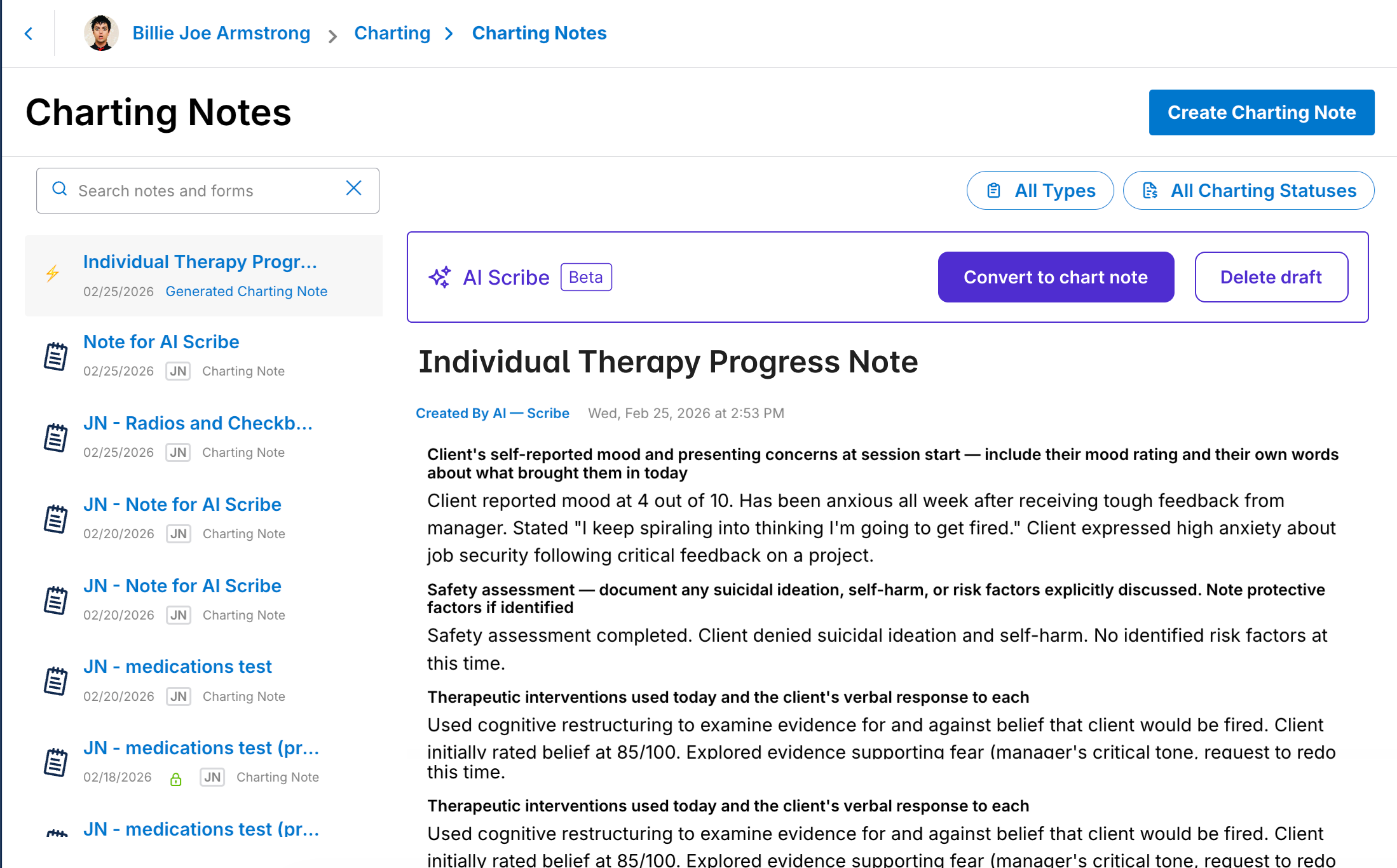
Clearer actions on draft notes
Draft Scribe notes now display prominent Convert and Delete buttons directly on the note, so you always know exactly what you can do next.
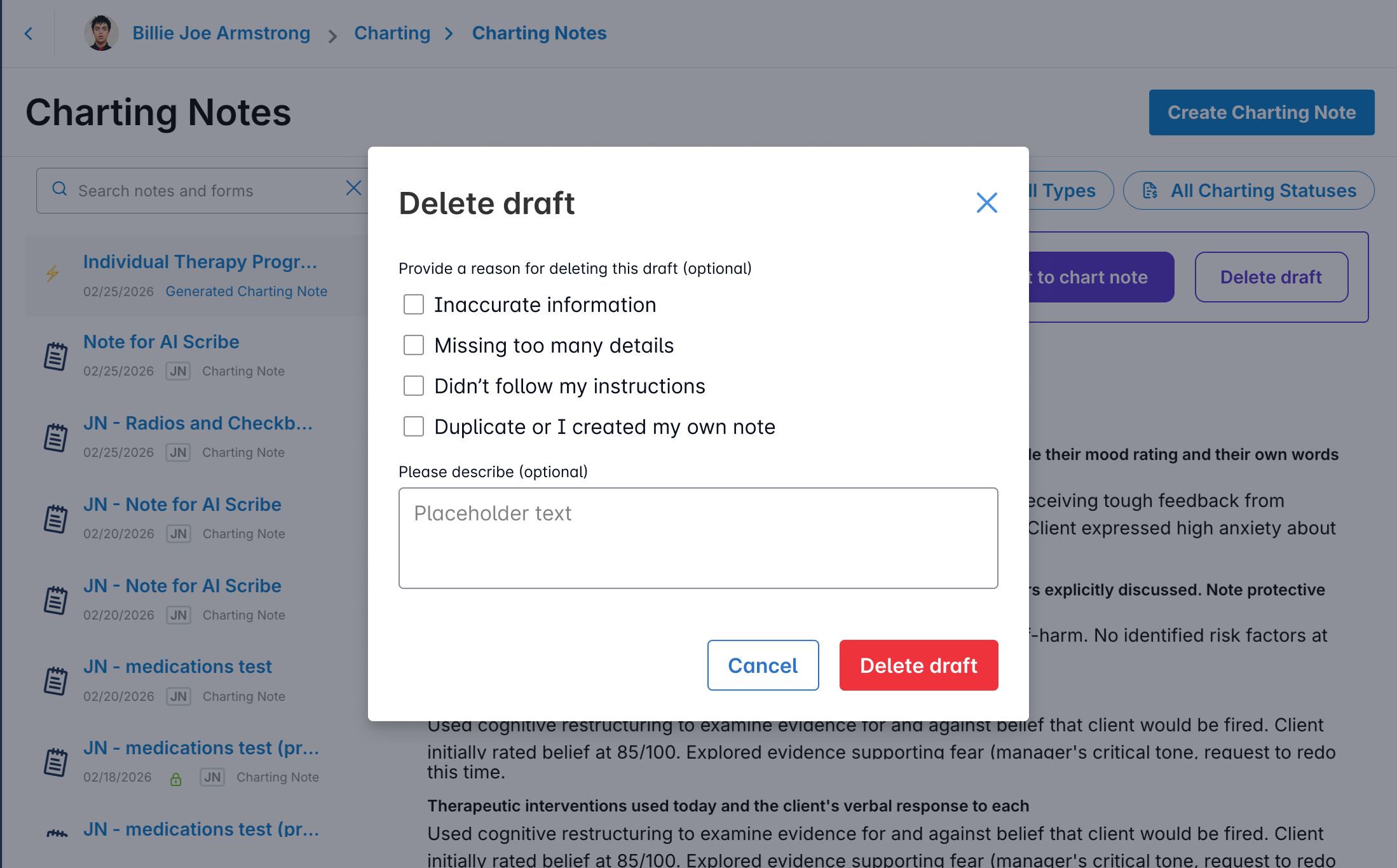
Feedback when deleting a draft
When deleting a Scribe draft, you'll be prompted to share a quick reason (e.g., inaccurate information, missing details). This helps us continuously improve Scribe quality based on real provider input.
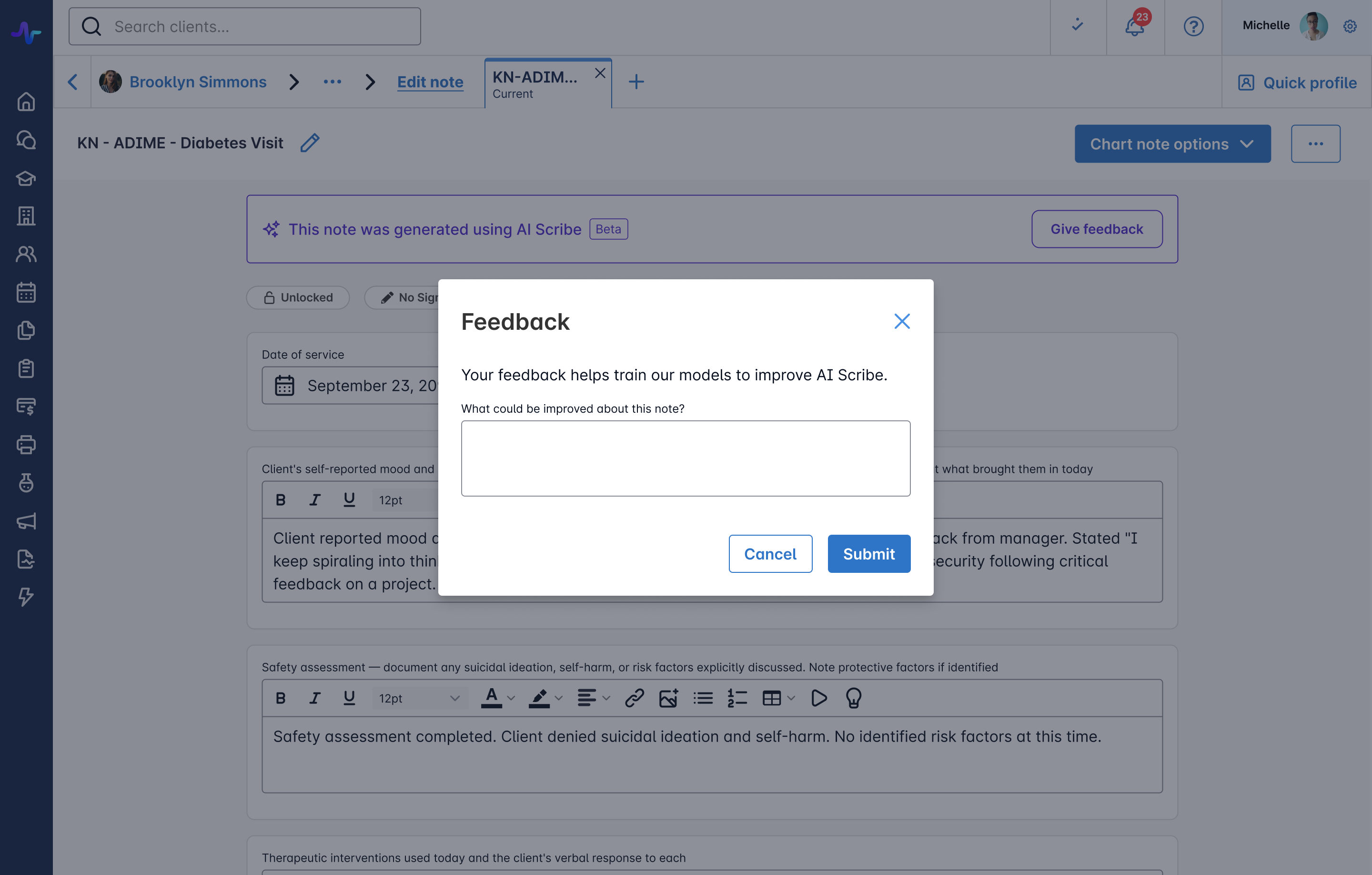
AI-generated note indicator on converted notes
Converted notes now display a banner confirming the note was generated using AI Scribe, along with a "Give Feedback" button to share thoughts in context.
AI Scribe Webhook Coverage — Full Lifecycle Events
We've extended Healthie's webhook infrastructure to cover the end-to-end AI Scribe workflow.
This update closes two gaps in the lifecycle:
Transcription Pipeline
appointment.transcript_started— fires when the transcription job beginsappointment.transcript_failed— fires when transcription fails; payload includesfailure_reasonandfailure_message
Chart Note Lifecycle
generated_form_answer_group.converted— fires when provider accepts/converts the AI-generated note into a chart notegenerated_form_answer_group.rejected— fires when provider rejects the notegenerated_form_answer_group.updated— fires when the AI Scribe note is regenerated or updatedgenerated_form_answer_group.deleted— fires when the generated note is soft-deleted
Updated: Independent Control Over Situational Pricing
Situational Pricing now operates on its own - no longer tied to your Auto-charge or Auto-invoice settings. Previously, changing these billing automation settings would disable Situational Pricing. Your practice now has more flexible control over session pricing.
What changed:
- Set it independently: Enable or disable Situational Pricing regardless of whether Auto-charge or Auto-invoice is turned on.
- Your settings stick: Situational Pricing toggle state saves and persists correctly across all billing setting combinations.
This feature is available in Settings > Appointments > Payments & Credits > Situational Pricing
Additional Updates
Minor bug fixes. Thank you for taking the time to report these issues to our team, so that we could diagnose and address them for those affected. If any of these issues persist, please let us know by contacting us at hello@gethealthie.com.
- Copied fields can no longer be duplicated repeatedly, reducing accidental or confusing form setups.
- Bug Fix - Appointment Banner Dismissal: The appointment banner will now stay dismissed once closed, rather than reappearing unexpectedly. This fix applies automatically across all plans — no action required.
- Addendums to charting notes now display in chronological order, consistent with how signatures appear. This fix ensures all charting note actions (signatures, addendums, and audit events) display chronologically across all viewing contexts.
- Active DoseSpot medications now visibly appear as active in chart notes, improving clarity while preserving their read-only behavior.
- Conditional charting modules now display consistently, even when responses include extra spacing, ensuring a predictable experience across view and edit states.
- Recurring form requests can now only be removed for the selected client from the Client Profile to prevent accidental deletion across all client groups, reducing confusion and ensuring requests behave as expected.
- Images uploaded in form answers (charting and intake) will now display inline with text, rather than as an attachment below the text box.
- Added an org-level setting to require insurance card photo uploads when clients complete the Insurance Form, helping reduce claim denials caused by missing card images. The setting is off by default and can be enabled by emailing hello@gethealthie.com.
- Fixed an issue where display-only fields (e.g. Title, Label, Read Only) in the Form Builder could be marked as required, preventing clients and providers from completing the form.
API Updates
All features added this month are also available directly via the API. In addition, we are laser focused on building a best-in-class customer experience, which includes continuously investing in, and iterating on, our developer experience. This will include updates to documentation, SDKs, Webhooks and more, throughout the upcoming months.
Healthie Dev Assist 2.0
Dev Assist 2.0 is a ground-up rebuild of the schema exploration server, faster, leaner, and cross-platform. Instead of making sequential tool calls to explore the API schema (search, wait, introspect, wait, follow a reference, wait again), the server now executes all schema operations in a single parallel block.
What's new
- Single
execute_healthie_codetool replaces the previoussearch_schema+introspectpair - Parallel schema traversal, explore multiple types simultaneously in one execution
- Live API execution via
healthie.query()andhealthie.mutate(), test against real response shapes, not just schema definitions - Structured JSON responses instead of raw SDL text, for cleaner reasoning by Claude or ChatGPT
- Removed macOS-only binary dependency; now pure Node.js, runs on any platform
- Pagination support on large types (e.g. User's 455 fields) to prevent runaway token consumption
The result is 64% fewer tokens consumed, 55% fewer round-trips, and ~5x faster responses on average, with the most complex cross-type queries seeing up to 84% token reduction.
Get Started
Drop-in replacement. No configuration changes required. Same .env format, same claude_desktop_config.json structure. Pull the update, restart the server.
👉 github.com/healthie/healthie-dev-assist
Past & Planned Updates
- View all updates from last month here.
- See planned product updates on our Product Roadmap. Subscribe to roadmap items to get notified when they go-live.
- Learn how to add comments and submit feedback to our Roadmap here.